Drupal Menu and Menu item Druxt components, with support for the JSON -API Menu Items module.



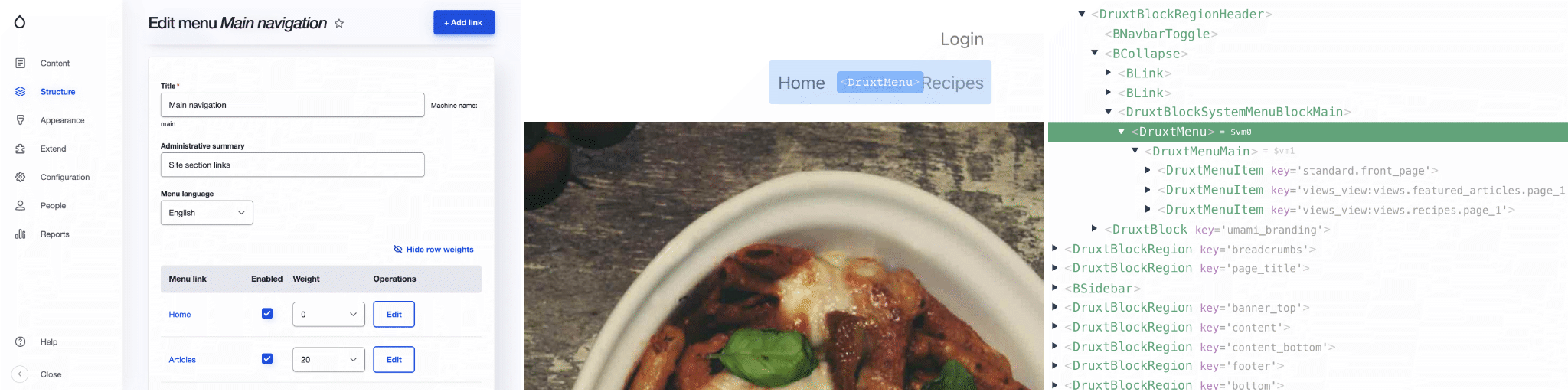
DruxtMenu renders Drupal menus in Nuxt. Ask for a menu by name and you get the tree Drupal manages; with the JSON:API Menu Items module it covers full menus, including module-defined links, not just content links. Every menu and menu item themes through the Druxt component suggestion system.
Features
- Vue.js components:
- DruxtMenu: Render Drupal menu by name
- Druxt settings: Filter JSON:API fields
- Drupal Menu blocks
- @nuxtjs/Storybook integration
Installation
-
Install the package:
npm i druxt-menu -
Add the module to
nuxt.config.js:export default { modules: ['druxt-menu'], druxt: { baseUrl: 'https://demo-api.druxtjs.org', }, };druxt.baseUrlis required: without it the generated plugin throwsThe 'baseUrl' parameter is required.
Drupal requirements
Rendering a menu needs data from the Drupal side, and where it comes from depends on what you want:
-
Menu blocks (the typical site case): rendered by the Blocks module: no extra Drupal setup.
-
Full menus by name (
<DruxtMenu name="main">): requires the JSON:API Menu Items Drupal module:composer require drupal/jsonapi_menu_items drush pm:enable jsonapi_menu_itemsOnce enabled, set
druxt.menu.jsonApiMenuItems: trueto fetch menus through thejsonapi_menu_itemsresource; without it Druxt keeps usingmenu_link_content. Multilingual menus needjsonapi_menu_items1.2.4or later.
Vue.js Components
DruxtMenu
Renders a Drupal menu using either the default Drupal content menus, or the full menu via the JSON:API Menu Items module.
<DruxtMenu name="main" :depth="1" />
- For more details, refer to the DruxtMenu API documentation.
Settings
Reducing JSON:API data
The default behaviour of the Menu module is to retrieve all available fields from the JSON:API.
This behaviour is configurable using the modules query option, allowing for manually filtered fields or automatically filtered fields using the requiredOnly option.
The default behaviour can be set via nuxt.config.js:
druxt: {
  menu: {
    query: {
      fields: [],
      requiredOnly: true,
    },
  },
}
Alternatively, the behaviour can be set directly on a Menu wrapper component:
<script>
export default {
  druxt: {
    query: {
      fields: ['description', 'options'],
      requiredOnly: false,
    },
  },
};
</script>
Menu blocks
The DruxtMenu module provides a DruxtBlockSystemMenuBlock component that is used by the Druxt Block module to render Drupal menu blocks.
- For more details, see the Druxt Blocks module.
Storybook
DruxtMenu provides zero-config, auto-generated Storybook integration with a live data connection to your Druxt backend.
- For more details, see the Storybook guide.
Deprecations
The items computed property is deprecated in favour of model. See the
deprecations page for what replaces it, and what
is unaffected.
Options
Druxt Menu options
These options are specific to this module.
| Option | Type | Required | Default | Description |
|---|---|---|---|---|
menu.jsonApiMenuItems | boolean | No | false | Use the Drupal JSON:API Menu Items module resource. |
menu.query.fields | string[] | No | false | An array of fields to filter all JSON:API Menu queries. |
menu.query.requiredOnly | boolean | No | false | Whether to automatically filter to module-defined minimum required fields. |
Base Druxt options
These options are available to all Druxt modules.
| Option | Type | Required | Default | Description |
|---|---|---|---|---|
axios | object | No | {} | Axios instance settings. |
baseUrl | string | Yes | null | Base URL for the Drupal installation. |
endpoint | string | No | /jsonapi | JSON:API Endpoint of the Drupal installation. |
Note: The contents of this file were automatically generated from the packages/menu/README.md.